
Search is changing shape. For two decades, typing a question into a search box meant scanning a page of blue links and deciding which one to open. That habit still works, and it still matters. But a growing share of queries now come back as a written answer, sometimes with a citation trail, sometimes with a suggested follow-up question, sometimes as a full conversation that continues across several turns.
This is not a story about traditional search disappearing. Google, Bing, and other conventional engines still index the web and still send billions of clicks to websites every day. What has changed is that several of the largest platforms now sit an AI layer on top of, or alongside, that retrieval process, and a handful of newer companies built their entire product around that idea from the start. The result is that anyone comparing the best AI search engines in 2026 is really comparing different philosophies about how much synthesis, conversation, and source transparency a search experience should offer.
This article walks through the major AI-powered search platforms available today, explains how their approaches to retrieval and answer generation differ, and helps you decide which one fits a given task, whether that is quick research, source discovery, everyday browsing, or long-form content research.
Direct Answer
There is no single best AI search engine in 2026. Perplexity and You.com’s ARI lean toward citation-heavy research work. ChatGPT Search and Google AI Mode favor conversational, follow-up-driven exploration. Google AI Overviews sits inside familiar search results for everyday queries. Microsoft Copilot Search fits Microsoft-centric workflows, and Brave Search suits users who want AI answers without moving away from a privacy-first index. The right choice depends on the task.
Key Takeaways
- AI search engines combine retrieval, synthesis, and conversation, but each platform balances those three elements differently.
- Traditional search and AI search are not mutually exclusive; most people now use both, often within the same session.
- Source transparency varies. Some platforms show every citation inline, others summarize with fewer visible links.
- Follow-up question support is now common across nearly every major platform, though the depth of context retained between turns differs.
- Research-heavy platforms like Perplexity and You.com prioritize source count and citation traceability, while assistant-first platforms like ChatGPT Search and Copilot prioritize conversational continuity.
- Google’s ecosystem alone offers two distinct AI search experiences, AI Overviews and AI Mode, that serve different depths of query.
- Website owners still need clear, well-structured, genuinely useful content, since AI search still depends on retrieving real information from real sources.
What Is an AI Search Engine?
An AI search engine is a platform that uses large language models alongside information retrieval to answer a query, rather than returning only a ranked list of links. Depending on the platform, this can include a synthesized written answer, source links or citations, the ability to ask natural-language follow-up questions, and a conversational interface that carries context from one question to the next.
Not every AI search platform works the same way. Some, like Perplexity, are built primarily as answer engines with heavy citation. Others, like Google AI Overviews, layer an AI-generated summary on top of an existing search results page. Others still, like ChatGPT Search, are a web search feature added to a general-purpose AI assistant. Understanding these structural differences matters more than treating “AI search” as one uniform category.
How AI Search Differs From Traditional Search
Traditional search engines work by indexing web pages and ranking them for a given query. The user reads a list of results, opens the pages that look relevant, and does their own synthesis.
AI search adds a layer on top of, or instead of, that list. A query might return a written answer that pulls information from several sources at once, along with suggested follow-up questions and, on most platforms, links back to the pages used to build that answer. Some AI search tools let users refine a question conversationally, asking for more detail, a different angle, or a narrower focus, without starting a new search from scratch.
It is worth being precise here: AI search still depends on retrieving and processing real information from the web or from a search index. The AI layer does not replace retrieval, it interprets and organizes it. When retrieval is thin, inaccurate, or based on a narrow set of sources, the generated answer inherits those limitations. This is why source transparency, meaning whether and how a platform shows where its answer came from, is one of the most useful things to evaluate when comparing tools.
How We Compared the AI Search Engines
This comparison looks at each platform against the same set of practical factors: the overall search experience, how conversational the tool is, whether it supports meaningful follow-up questions, how transparent it is about sources, how it accesses web information, how useful it is for research tasks, how easy it is to use, and which use cases it fits best.
This is not a scored benchmark and does not assign numerical ratings. Public benchmark claims from individual companies change frequently and are not independently verifiable in a way that belongs in a comparison article. Instead, each platform is described based on its documented, currently available capabilities.
The Best AI Search Engines in 2026
Perplexity
Perplexity is built around the idea of an answer engine: you ask a question and receive a synthesized response with inline citations, rather than a page of links to sort through yourself. Its standard search mode handles everyday questions, while Pro Search is designed for more complex, multi-part queries that benefit from checking a larger number of sources before composing an answer.
Best For
Research tasks where verifying the source of a claim matters, and multi-part questions that benefit from a more thorough search pass.
Key Strengths
Citations appear inline and link directly to the pages used to generate the answer, which makes fact-checking straightforward. Perplexity also supports Spaces, which function as organized research folders where users can set standing instructions and keep related searches together, and it offers deeper research modes for questions that need more than a single pass through the web.
Things to Consider
Perplexity is not a general-purpose writing or coding assistant in the way a full AI chat platform is, and answer quality still depends on the sources available for a given query. It is also not automatically the most accurate option for every type of question; like any AI search tool, it can misread or overweight a source.
Who Should Use It?
Researchers, students, content creators, and professionals who want a source-first search experience with visible citations they can check themselves.
ChatGPT Search
ChatGPT Search is a web search capability built into ChatGPT, distinct from ChatGPT’s general conversational ability, which draws on its training data. When a question would benefit from current information, ChatGPT can search the web, pull in relevant results, and generate an answer with linked sources. Search can trigger automatically for time-sensitive questions or be selected manually from the tools menu.
Best For
Users already working inside ChatGPT who want to ask a question in natural language and follow up conversationally without switching to a separate search tool.
Key Strengths
Search happens inside an ongoing conversation, so follow-up questions retain the context of everything discussed earlier. Citations are clickable, and a dedicated sources view lets users see which pages were used to build a given answer.
Things to Consider
Not every ChatGPT response uses live web search. It is important to distinguish between ChatGPT answering from its general training and ChatGPT actively searching the web for a specific query, since only the latter reflects current information with sources. Search availability and usage limits can also depend on plan and workspace settings.
Who Should Use It?
People who already use ChatGPT for writing, planning, or general assistance and want current web information without leaving the conversation.
Google AI Mode
Google AI Mode is a conversational search experience inside Google Search, built for questions that are complex, multi-part, or hard to phrase as a short query. It uses Google’s Gemini model and supports follow-up questions that build on the context of the current search session, along with multimodal input such as images.
Best For
Open-ended or exploratory questions where a single short query is not enough to capture what the user actually wants to know.
Key Strengths
AI Mode is designed for back-and-forth exploration, letting users refine a question, ask a follow-up, or approach a topic from a different angle within the same session. It draws on Google’s web index and can surface links to supporting pages alongside its responses.
Things to Consider
AI Mode is a distinct experience from AI Overviews within Google Search, and the two should not be treated as the same feature. AI Mode is built for deeper, more conversational exploration, while AI Overviews appears within standard search results for a broader range of everyday queries.
Who Should Use It?
Users already inside the Google ecosystem who want a more conversational way to work through complex or layered questions.
Google AI Overviews
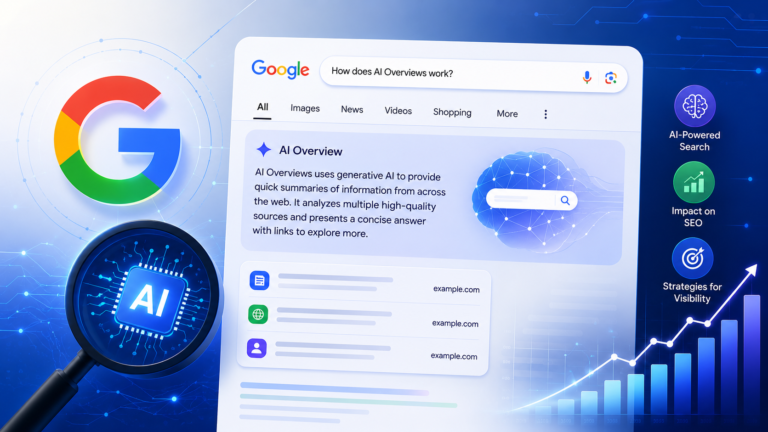
AI Overviews is a different feature from AI Mode, and the distinction matters. AI Overviews generates an AI summary that appears directly within standard Google Search results for a given query, sitting above or alongside the usual list of links, rather than replacing the search results page entirely.
Best For
Everyday searches where a quick summary alongside familiar search results is useful, without switching to a separate conversational mode.
Key Strengths
AI Overviews keeps the traditional search results layout intact, so users can read a generated summary and still scan the linked pages underneath it in the same view. Google has also added the ability to ask a follow-up question directly from an AI Overview, which moves the user into a more conversational flow when needed. For a deeper explanation of how this feature works, see Google AI Overviews.
Things to Consider
AI Overviews is meant for broad, high-volume search traffic rather than deep research sessions, so it does not offer the same depth of source exploration as AI Mode or a dedicated research tool.
Who Should Use It?
General users doing everyday searches who want a quick summary without leaving the familiar Google Search interface.
Microsoft Copilot Search
Microsoft Copilot includes a dedicated search experience that generates AI answers grounded in web results from the Bing search service, with citations shown prominently within the response and an expanded view for seeing all referenced sources at once.
Best For
Users working within Microsoft’s ecosystem, particularly those already using Copilot across Windows, Edge, or Microsoft 365, who want AI search without switching tools.
Key Strengths
Copilot Search places citations directly in the response and offers a consolidated view of all sources used, which supports source verification. Within Microsoft 365 workspaces, Copilot can also ground answers in internal documents and data alongside web results, which is useful for business research that blends public and organizational information.
Things to Consider
Some of Copilot’s more advanced grounding and citation features are tied to Microsoft 365 plans and workspace settings, so the experience can vary depending on the license and environment a user has access to.
Who Should Use It?
Professionals and organizations already using Microsoft 365 or Edge who want AI search integrated into tools they already rely on daily.
Gemini
Gemini is Google’s AI assistant, and its role in search-related discovery comes primarily through its ability to answer questions using both its own reasoning and, where enabled, connected information sources. Gemini also powers the underlying models used in Google AI Mode and AI Overviews, which links it closely to Google’s broader search experience without being identical to either feature.
Best For
Users who want a conversational AI assistant that can help explore a topic, connect to other Google apps, and support broader information tasks alongside search.
Key Strengths
Gemini supports natural-language questions, follow-up conversation, and connections to services like Gmail and Google Photos when a user chooses to enable them, which can make search results more personally relevant. It benefits from continuous model updates across Google’s ecosystem.
Things to Consider
Gemini as a standalone assistant is a broader product than a dedicated search engine, and its search-specific capabilities overlap significantly with AI Mode rather than existing as a fully separate search tool.
Who Should Use It?
Users who want an AI assistant that blends conversation, personal context, and information discovery in one place, rather than a narrowly defined search tool.
Brave Search
Brave Search includes an AI answer feature, currently called AI Answers, that generates a synthesized response to a query using Brave’s own independently built search index rather than relying on results licensed from Google or Bing. The feature sits above the standard organic results and cites the sources it draws from.
Best For
Users who want an AI-generated answer without moving away from a privacy-oriented, independent search index.
Key Strengths
Brave Search draws from its own index rather than a licensed feed from a larger search provider, and AI Answers cites the sources used to build a response. All AI features in Brave Search can be turned off from the settings menu for users who prefer a traditional results-only experience.
Things to Consider
Because Brave relies on its own independently built index rather than Google’s or Bing’s much larger index, coverage and answer depth for less common or highly specific queries can differ from what larger, more established indexes return.
Who Should Use It?
Privacy-conscious users who want AI-assisted answers while keeping their search activity outside of the larger advertising-driven search ecosystems.
You.com
You.com combines conversational AI search with ARI, a research agent designed for more in-depth, source-heavy reports rather than quick single-turn answers. Where a standard AI search query returns a synthesized response with citations, ARI is built specifically for longer research tasks that draw on a larger number of sources and can output a structured report.
Best For
In-depth research projects that need a large number of sources synthesized into a single, traceable document, rather than a quick everyday answer.
Key Strengths
You.com’s ARI is built around citation traceability, allowing users to trace specific claims, figures, and charts back to their original sources. This depth-first approach differentiates You.com from search tools optimized primarily for quick, single-turn answers.
Things to Consider
ARI’s most advanced research capabilities are positioned toward business and enterprise research use cases, and deeper report generation may involve longer processing time than a typical quick search query.
Who Should Use It?
Analysts, researchers, and business professionals who need a structured, citation-heavy research output rather than a brief conversational answer.
AI Search Engine Comparison Table
| AI Search Engine | Best For | Conversational Search | Source Links or Citations | Best Use Case |
|---|---|---|---|---|
| Perplexity | Citation-first research | Yes | Available, shown inline | Verifying claims and multi-source research |
| ChatGPT Search | Search within an ongoing AI conversation. | Yes. | Available, clickable | Combining web search with general AI assistance |
| Google AI Mode | Complex, multi-part questions | Yes. | Available, varies by query | Exploring layered or hard-to-phrase questions |
| Google AI Overviews | Quick summaries within standard search | Limited follow-up available | Available, links to supporting pages | Everyday search with familiar results layout |
| Microsoft Copilot Search | Search inside the Microsoft ecosystem. | Yes. | Available, with consolidated source view | Research combining web and Microsoft 365 content |
| Gemini | Conversational AI with personal context | Yes. | Depends on connected sources and features | Broader information tasks alongside search |
| Brave Search | Privacy-focused AI answers | Limited | Available | Quick AI answers from an independent index |
| You.com | Deep, structured research reports | Yes | Available, traceable to source data | Business and analytical research projects |
Which AI Search Engine Is Best for Different Use Cases?
Best for research: Perplexity and You.com’s ARI both prioritize citation depth and source traceability, making them well suited to work that requires verifying claims against original sources.
Best for conversational search: ChatGPT Search and Google AI Mode are both built around sustained, multi-turn conversation, letting users refine a question repeatedly within the same session.
Best for everyday search: Google AI Overviews fits casual, high-frequency search because it keeps the familiar results page intact while adding a summary on top.
Best for source discovery: Perplexity’s inline citations and You.com’s ARI reports both make it straightforward to trace an answer back to specific pages.
Best for Google users: Users already inside Google’s ecosystem have two distinct options depending on depth: AI Overviews for quick everyday queries and AI Mode for more complex, conversational research.
Best for privacy-focused users: Brave Search stands out for using its own independent index and letting users disable AI features entirely.
Best for AI-assisted exploration: Gemini offers a broader assistant experience that blends search with personal context and connections to other Google apps, which suits users who want exploration beyond a narrow search box.
In several of these categories, more than one platform is genuinely well suited to the task, and the better choice often comes down to which ecosystem or workflow a person already uses.
How AI Search Is Changing the Way People Find Information
The shift toward AI search is changing user behavior in a few consistent ways. Queries are becoming longer and more conversational, closer to how someone would ask a question out loud than the short keyword phrases typical of traditional search. Follow-up questions are increasingly common within a single search session rather than users starting a new search each time they need more detail. And summarized answers are, for many queries, reducing the need to open multiple individual pages just to piece together a basic answer.
None of this eliminates the value of the underlying web content. AI-generated answers still depend on real information from real sources, and users still click through to original pages when they want more depth, want to double-check a claim, or are looking for something an AI summary cannot fully capture, such as a full analysis, a product listing, or a first-hand account. Traditional search and AI search are increasingly used together within the same research or browsing session rather than as competing alternatives.
What AI Search Means for SEO and Website Owners
AI search does not eliminate the importance of good content, but it does change how that content gets discovered and used. When an AI system summarizes information from a page rather than sending a reader directly to it, visibility depends on how clearly that page communicates its key points, not just on traditional ranking signals alone.
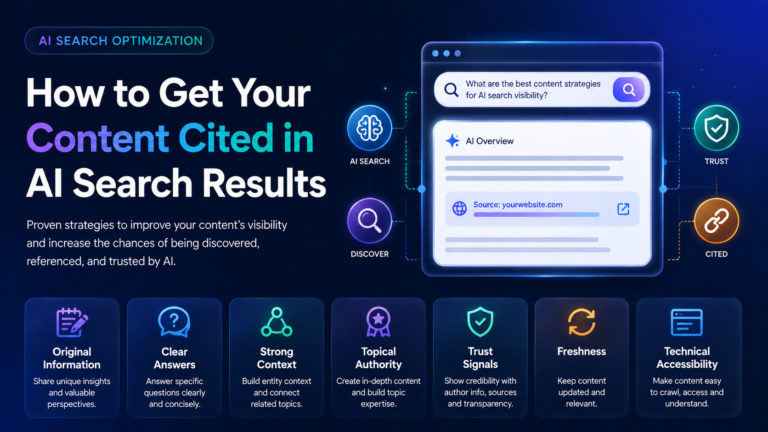
This has pushed many content creators and website owners toward practices sometimes described under AI search optimization, which focuses on making content genuinely useful, clearly structured, and easy for both readers and AI systems to understand and cite accurately.
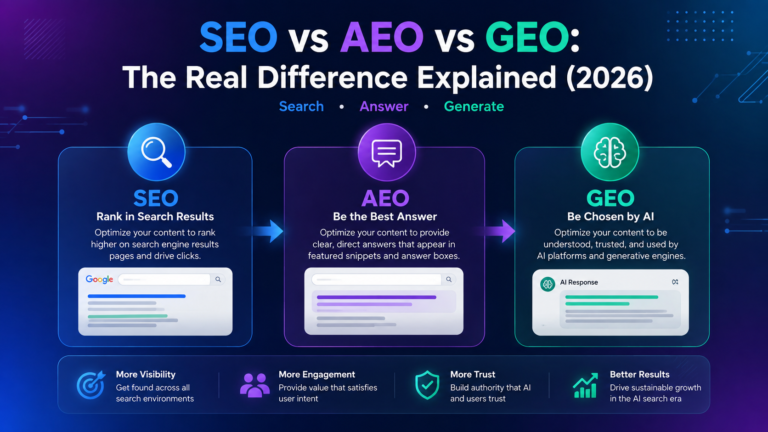
It has also contributed to a broader conversation about how traditional SEO relates to newer disciplines built around AI-generated answers, a topic covered in more depth in SEO vs AEO vs GEO. The core principle across all of these approaches remains the same: content still needs to be useful, accurate, and technically accessible, whether it is being read by a person or processed by an AI system on that person’s behalf.
Final Verdict
The best AI search engine in 2026 depends on what a person is actually trying to do. Perplexity and You.com’s ARI serve research-heavy work where citation depth matters most. ChatGPT Search and Google AI Mode suit conversational, multi-turn exploration. Google AI Overviews handles everyday search without disrupting familiar habits. Microsoft Copilot Search fits naturally into Microsoft-centric workflows, Brave Search appeals to privacy-conscious users, and Gemini works well for those who want a broader assistant experience layered into their search habits.
Rather than searching for one universal winner, it makes more sense to match the tool to the task. Someone verifying a technical claim, someone drafting a blog post, and someone checking tomorrow’s weather are not looking for the same thing from a search engine, even if all three now expect an AI-generated answer somewhere along the way.